On this page
Walk through any app store and you will find thousands of games claiming to be educational for young children. The honest truth is that most are not. A flashing screen with cartoon characters is not the same as a thoughtfully designed learning experience. As a parent, knowing what separates a genuinely good toddler game from digital noise is half the battle. Here is a practical guide.
What Makes a Toddler Game Actually Educational
The best learning games for young children share a few clear qualities. If a game is missing these, it is probably entertainment dressed up as education.
- Age-appropriate simplicity. Toddlers need one clear task at a time, not busy screens crammed with options.
- Large, tappable elements. Little fingers lack precision, so buttons and objects should be big and forgiving.
- Instant, positive feedback. A cheerful sound or animation when they succeed teaches cause and effect and keeps them engaged.
- Clear learning focus. Good games target something specific, such as colours, shapes, or matching, rather than being a random jumble.
- Calm design. Overstimulating visuals and loud, chaotic sounds overwhelm rather than teach.
If a game feels frantic to you, it is almost certainly too much for a toddler.
Safety Comes First, Always
For this age group, safety is not a feature, it is a requirement. Before anything else, a toddler app must protect the child. Look for these non-negotiables:
- No ads shown to children. Adverts are inappropriate, distracting, and can lead little fingers somewhere they should not go.
- Protected in-app purchases. Any purchase should sit behind a parental gate so a curious tap never triggers a charge.
- No external links or social features. A toddler app should be a closed, safe environment with no way out to the wider internet.
- Strong privacy. The best apps collect no data from children at all.
A game can be beautifully educational, but if it is not safe, it does not belong on your child's screen.
Skills That Matter, Age by Age
Toddlers develop quickly, and what helps a one-year-old differs from what challenges a four-year-old. Here is a rough guide to what to encourage at each stage.
Age 1
At this stage it is all about cause and effect and sensory delight. A simple tap that produces a sound, a colour, or a movement teaches your child that their actions have results. Keep it extremely simple. Big shapes, bright colours, gentle sounds.
Age 2
Two-year-olds start recognising and naming things. Games that introduce animals, colours, and simple shapes support fast-growing vocabulary. Matching a picture to a sound, or tapping the animal that goes "moo", turns play into early language learning.
Age 3
Three-year-olds are ready for early counting, letters, and simple problem solving. Basic number recognition, matching games, and gentle memory challenges suit this stage. They can now follow a simple instruction and feel real pride in getting it right.
Age 4
Four-year-olds can handle more structured learning. Early phonics, counting a little higher, sorting by category, and slightly more complex matching and memory games all build school-readiness. They enjoy a gentle challenge and the satisfaction of mastering it.
Healthy Screen Time Habits
Even the best educational game is a tool, not a babysitter. How you use it matters as much as which one you choose.
- Keep sessions short. Young children learn best in brief bursts, not long stretches in front of a screen.
- Play together when you can. Co-playing turns screen time into shared time and helps your child learn far more.
- Balance with the real world. Blocks, books, drawing, and outdoor play remain irreplaceable. Digital games should complement them, never replace them.
- Model calm use. Children copy what they see, so your own screen habits set the tone.
Think of learning games as one small part of a rich, varied day rather than the centre of it.
Watch How Your Child Responds
Every toddler is different, and the best guide to whether a game is right is your own child in front of it. Notice how they react. A good learning game leaves a child calm, focused, and pleased when they succeed. If a game leaves your toddler agitated, frustrated, or unable to stop, that is a signal to step back, whatever the app claims about its educational value. Pay attention too when they lose interest, since a game that no longer challenges them has done its job, and moving on to something slightly harder keeps learning fresh. You know your child better than any app store rating, so trust what you see.
Look for Games That Grow With Them
The most useful toddler apps span a range of ages rather than locking into a single narrow stage. A child changes enormously between one and four, and a game that offers gentle activities for the youngest and slightly richer challenges for older toddlers can grow alongside them. This saves you constantly hunting for replacements and lets your child return to a familiar, trusted environment as their skills develop. Progression built into a single safe app is far more valuable than a scattered collection of one-note games.
Examples of Good Learning Game Types
When browsing, look for these proven formats that genuinely teach:
- Matching games that pair pictures, colours, or sounds and build memory and recognition.
- Shape and colour sorting that develop visual discrimination.
- Simple counting games that introduce numbers in a playful way.
- Letter and animal recognition that grow vocabulary.
- Tap-and-respond games that teach cause and effect for the youngest players.
A well-rounded app bundles several of these into one safe place.
A Safe, All-in-One Option
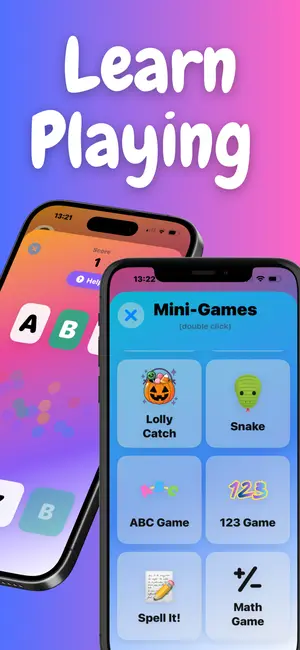
If you would rather not piece together a dozen separate games, an app built specifically for this age range makes life easier. Baby Learning Games 1-4 brings together colourful mini-games covering colours, shapes, numbers, letters, animals, and matching, all designed for tiny fingers and short attention spans. Crucially, it is built with safety first, with no ads shown to children, purchases protected from accidental taps, no social features or external links, and no data collection. It gives your toddler a genuinely educational, child-safe place to play and learn.
Download Baby Learning Games Free →
Learn more on the Baby Learning Games page.
The Takeaway
The best educational games for toddlers are simple, safe, and focused, with big buttons, instant encouragement, and a clear learning goal. Match the skills to your child's age, keep sessions short, and play alongside them whenever you can. Choose safety over flash every time, and remember that the richest learning still happens through blocks, books, and time with you. Used wisely, a good learning game is a small but genuinely helpful part of your toddler's day.
Written by PG App Studios
An independent app studio in the Algarve run by Pedro Gregório. We write about the problems our apps solve, from learning European Portuguese to raising a toddler.